
Invite someone to your household
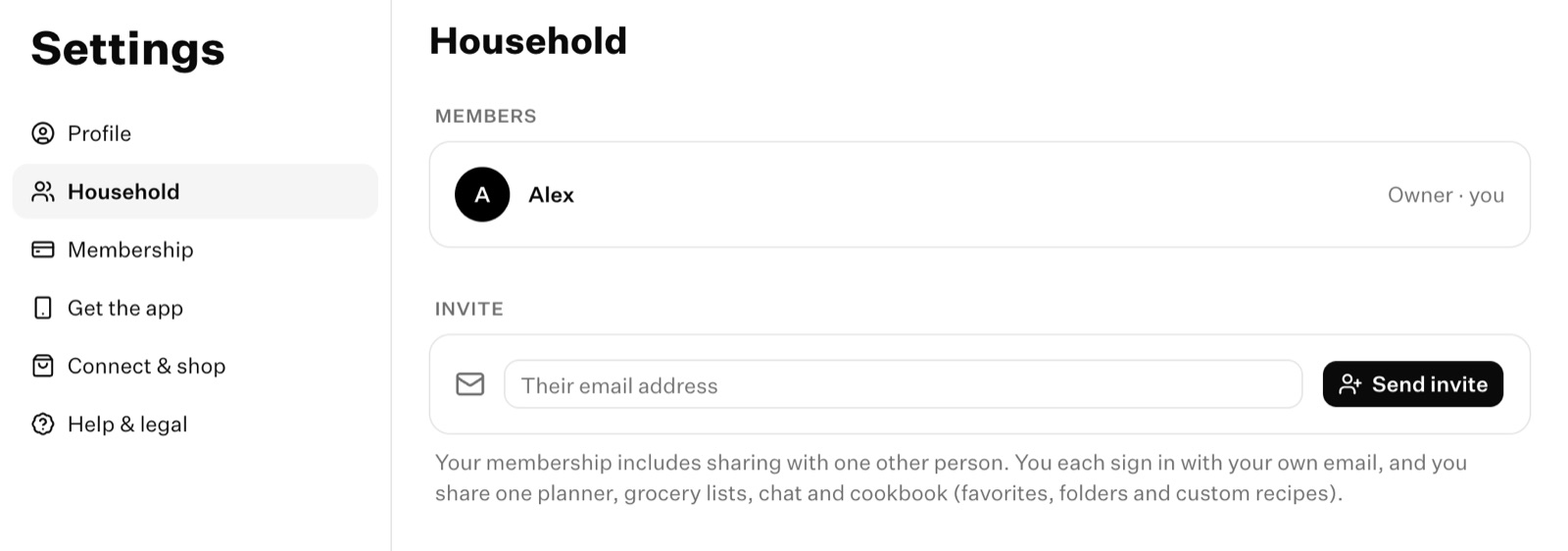
Send an invite by email from Settings → Household. They have 14 days to join.
Updated November 5, 2026
You'll need a membership and the other person's email address. The invite only works for that address, so use the one they sign in to Cook Well with, or will sign up with.
- Open the Cookbook tab, tap your initials at the top of the screen, then tap the gear to open Settings.
- Tap Household.
- Tap Invite someone.
- Enter their email and tap Send invite.
- Open the menu next to your name at the bottom of the sidebar and choose Settings.
- Choose Household.
- Under Invite, enter their email and choose Send invite.
What they get
We email them from Cook Well with your name. The email asks them to sign in with that address, on the web or in the app. If they're new to Cook Well, signing up with that address puts them straight into your household. See Join a household.
Resend or cancel an invite
Your invite shows in Settings → Household with the date it expires. From there you can:
- Resend it. This sends the email again and gives them another 14 days.
- Revoke it, to invite someone else instead. You can have one invite out at a time.
Invite didn't arrive? Ask them to check spam for an email from Cook Well. They can also sign in and go to Settings → Household, where the invite is waiting.
Something here out of date or unclear? Email support@cookwell.com.